Peter Parker tries to stop Adrian 'The Vulture' Toomes from selling
weapons made with advanced Chitauri technology while trying to
balance his life as an ordinary high school student.
In the evening I watched Spider-Man:
Homecoming. I liked the movie
and rate it a 7 out of 10.
Yesterday I learned how to change the margin of the PDF file Pandoc
generates. But I forgot about the paper size. I live in the
Netherlands and A4 is the common format here. First, I wanted to know
how to check the current paper size of a PDF file. This can be done on
the macOS command line as follows:
mdls freecodecamp.pdf |
    grep -i page
This reports the number of pages, the height (792 for US letter) and
width (612 for US letter). The values are in PostScript points; 1"
equals 72 points or 8.5" × 11" for US letter.
How to change this? Well, it turns out that with one Pandoc variable
one can control both the margin and the paper size:
-V geometry="margin=1in,a4paper"
So the command for generating the PDF via Pandoc in a Docker container
and viewing the output in the Preview application on macOS becomes:
In the evening I wanted to know at what time exactly I had run a
specific command on the command line of macOS. Could I get the history
of commands entered on the command line with each a time stamp? The
answer is yes, with fc (Fix Command):
fc -li 1
This lists (-l) the history from the start (1) with time stamps in ISO8601
format (-i). Note that without the 1 you get the last maximum 16
commands.
Now I could grep the output of this command. But wait, fc comes with
a match option (-m):
fc -li -m 'docker*' 1
This lists all events in the history that starts with docker and
shows the ISO8601 time stamp.
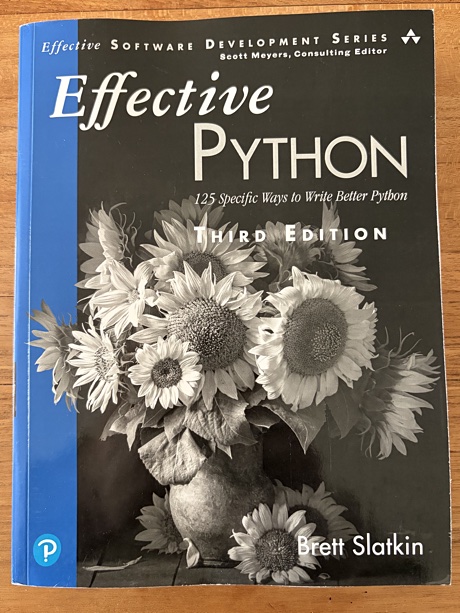
Today my copy of Effective Python Third
Edition
arrived. The book by Brett Slatkin has 125 specific ways to write
better Python.
Effective Python, third edition.
I browsed the book a bit and it looks very good! I like
how the program listings have colors. After I have finished the Python Certification course on
freeCodeCamp I want either start in
this book or continue with the 2nd edition of Fluent
Python
by Luciano Ramalho. I have reread the first two chapters of the
latter. Quite some time ago I managed to study the book until about
halfway. But I want to redo this.
Yesterday I learned how to generate a PDF file with the official
Pandoc LaTeX Docker image on macOS. The resulting PDF looked good, but
has a huge margin around the body of text. Today I created a
header.tex file with the following contents to be passed on to LaTeX:
Last week I started with the Python Certification course on
freeCodeCamp. I keep handwritten
notes on paper which I transfer later to a Markdown file using vim.
I wanted to convert this Markdown file to a PDF file using
Pandoc. Because I have already
Docker running on my Mac mini I checked if
there was an official Docker image.
I first tried the Pandoc
minimal image. I ran into
an issue: Permission denied. Adding -v /tmp:/tmp to the command
solved this issue, but now it reported 'pdflatex' not found. This
version was too minimal!
So, next I tried the aptly named
latex image as follows:
docker run --rm \
  -v "$(pwd):/data"\
  -u $(id -u):$(id -g) \
  pandoc/latex freecodecamp.md \
  -o freecodecamp.pdf &&
  open freecodecamp.pdf
This downloaded the image (only the first time), generated the PDF and
opened the PDF file in the Preview application on macOS.